
Customizing BASH: PS1
There are allot of white papers on customizing the bash prompt. This one is of course different... by a small margin. It starts by mapping out colors from "\033" or "ESC" commands into text commands for better reading, modifying, or if you change your background with a transparent terminal running most of the time you need to change colors of your text, this should help somewhat.
You will need a dependency:
#.bashrc
DULL=0
BRIGHT=1
FG_BLACK=30
FG_RED=31
FG_GREEN=32
FG_YELLOW=33
FG_BLUE=34
FG_VIOLET=35
FG_CYAN=36
FG_WHITE=37
FG_NULL=00
BG_BLACK=40
BG_RED=41
BG_GREEN=42
BG_YELLOW=43
BG_BLUE=44
BG_VIOLET=45
BG_CYAN=46
BG_WHITE=47
BG_NULL=00

ESC="\033"
NORMAL="\[$ESC[m\]"
RESET="\[$ESC[${DULL};${FG_WHITE};${BG_NULL}m\]"
BLACK="\[$ESC[${DULL};${FG_BLACK}m\]"
RED="\[$ESC[${DULL};${FG_RED}m\]"
GREEN="\[$ESC[${DULL};${FG_GREEN}m\]"
YELLOW="\[$ESC[${DULL};${FG_YELLOW}m\]"
BLUE="\[$ESC[${DULL};${FG_BLUE}m\]"
VIOLET="\[$ESC[${DULL};${FG_VIOLET}m\]"
CYAN="\[$ESC[${DULL};${FG_CYAN}m\]"
WHITE="\[$ESC[${DULL};${FG_WHITE}m\]"
BRIGHT_BLACK="\[$ESC[${BRIGHT};${FG_BLACK}m\]"
BRIGHT_RED="\[$ESC[${BRIGHT};${FG_RED}m\]"
BRIGHT_GREEN="\[$ESC[${BRIGHT};${FG_GREEN}m\]"
BRIGHT_YELLOW="\[$ESC[${BRIGHT};${FG_YELLOW}m\]"
BRIGHT_BLUE="\[$ESC[${BRIGHT};${FG_BLUE}m\]"
BRIGHT_VIOLET="\[$ESC[${BRIGHT};${FG_VIOLET}m\]"
BRIGHT_CYAN="\[$ESC[${BRIGHT};${FG_CYAN}m\]"
BRIGHT_WHITE="\[$ESC[${BRIGHT};${BG_WHITE}m\]"
REV_CYAN="\[$ESC[${DULL};${BG_WHITE};${BG_CYAN}m\]"
REV_RED="\[$ESC[${DULL};${FG_YELLOW}; ${BG_RED}m\]"

PROMPT_COMMAND='export ERR=$?'
Its possible you need a ".bash_profile" here is one you can use if you don't have one. Put it in your home directory, along with ".bashrc"
#.bash_profile
source .bashrc
if [ -f ~/.bashrc ]; then
	. ~/.bashrc
fi
#End Script
Lets put it to work: I personally would comment out my currently working ##"PS1=" and put it below it in case you need to change it back for some reason.
Note: Works best if it is one line.
PS1="${GREEN}YOUR COMPANY NAME HERE${BRIGHT_YELLOW}[${YELLOW}\u@\h${BRIGHT_YELLOW}]\n${BRIGHT_CYAN}[${CYAN}\t${BRIGHT_CYAN}]${BRIGHT_VIOLET}[${VIOLET}\$(~/sbin/lsMB)${BRIGHT_VIOLET} | ${VIOLET}\$(~/sbin/lsMiB)${BRIGHT_VIOLET}]${WHITE}[ \w ]\n${YELLOW}$> ${RESET}"
Should look like this minus the colors:
YOUR COMPANY NAME HERE[su_pyrow@CompElitePC.host56.com]
[13:57:23][590.478 MB|563.316 MiB][/media/cdrom]
$>
With colors:
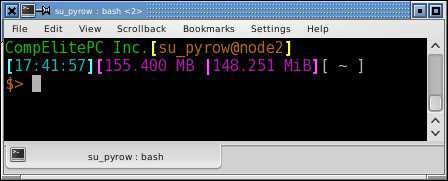
To get the sum of files in current working directory, I made two files which do the summing. "lsMB" and "lsMiB" which on my system are both located in ~/sbin as executable. Here is lsMB:
#!/bin/bash
#lsMB free for anyone who wishes to implement it.
let TotalBytes=0
for Bytes in $(ls -l -a | grep "^-" | awk '{ print $5 }')
do
   let TotalBytes=$TotalBytes+$Bytes
done
if [ $TotalBytes -lt 1024 ]; then
   TotalSize=$(echo -e "scale=3 \n$TotalBytes \nquit" | bc)
   suffix="B"
else if [ $TotalBytes -lt 1048576 ]; then
   TotalSize=$(echo -e "scale=3 \n$TotalBytes/1024 \nquit" | bc)
   suffix="kB"
else if [ $TotalBytes -lt 1073741824 ]; then
   TotalSize=$(echo -e "scale=3 \n$TotalBytes/1048576 \nquit" | bc)
   suffix="MB"
else if [ $TotalBytes -lt 1099511627776 ]; then
   TotalSize=$(echo -e "scale=3 \n$TotalBytes/1073741824 \nquit" | bc)
   suffix="GB"
fi
fi
fi
fi
echo -n "$TotalSize $suffix"
#End Script
Finally, this is the lsMiB executable file located in "~/sbin" This has the modification for the conversion to KiB, MiB & GiB one could further the code to handle TB/TiB easily by calculating from the above and using WIKI Terabyte and WIKI Tebibyte.
#!/bin/bash
#lsMiB free for anyone who wishes to implement it.
let TotalBytes=0
for Bytes in $(ls -l -a | grep "^-" | awk '{ print $5 }')
do
   let TotalBytes=$TotalBytes+$Bytes
done
if [ $TotalBytes -lt 1024 ]; then
   TotalSize2=$(echo -e "scale=3 \n$TotalBytes \nquit" | bc)
   suffix2="B"
else if [ $TotalBytes -lt 1048576 ]; then
   TotalSize2=$(echo -e "scale=3 \n$TotalBytes/1024*.976 \nquit" | bc)
   suffix2="KiB"
else if [ $TotalBytes -lt 1073741824 ]; then
   TotalSize2=$(echo -e "scale=3 \n$TotalBytes/1048576*.954 \nquit" | bc)
   suffix2="MiB"
else if [ $TotalBytes -lt 1099511627776 ]; then
   TotalSize2=$(echo -e "scale=3 \n$TotalBytes/1073741824*.931 \nquit" | bc)
   suffix2="GiB"
fi
fi
fi
fi
echo -n "$TotalSize2 $suffix2"
#End Script
One would be able to see the changes if 1) Restart the Terminal or 2) type
$ source ~/.bashrc
and you will instantly see the changes.
Extras
genpasswd () {
	local l=$1
       	[ "$l" == "" ] && l=16
      	tr -dc A-Za-z0-9_ < /dev/urandom | head -c ${l} | xargs
}


extract () {
    if [ -f $1 ] ; then
        case $1 in
            *.tar.bz2)   tar xjf $1	;;
            *.tar.gz)    tar xzf $1	;;
            *.bz2)       bunzip2 $1	;;
            *.rar)       rar x $1	;;
            *.gz)        gunzip $1	;;
            *.tar)       tar xf $1	;;
            *.tbz2)      tar xjf $1	;;
            *.tgz)       tar xzf $1	;;
            *.zip)       unzip $1	;;
            *.Z)         uncompress $1	;;
            *.7z)        7z x $1	;;
            *)           echo "'$1' cannot be extracted via extract()" ;;
        esac
    else
        echo "'$1' is not a valid file"
    fi
}

mkcompressed () {
   FILE=$1
   shift
   case $FILE in
      *.tar.bz2) tar cjf $FILE $*  ;;
      *.tar.gz)  tar czf $FILE $*  ;;
      *.tgz)     tar czf $FILE $*  ;;
      *.zip)     zip $FILE $*      ;;
      *.rar)     rar $FILE $*      ;;
      *)         echo "Filetype not recognized" ;;
   esac
}

remindme () {
    sleep $1 && zenity --info --text "$2" &
}